 Process Automation
Every AI tool now reads the same company knowledge
A team that re-explained the company to every AI tool now shares one knowledge layer over one MCP connection. Every answer cites its source; review is a click.
An HR team spent 15 hours a day on ~30 inquiries. With an AI HR agent on an internal knowledge library, the same volume wraps in under 2 hours, in one channel.
Office staff, factory workers, and foreign workers followed different rules, and questions came in by email, chat, phone, and walk-up
The client is a mid-sized food manufacturing and distribution company with about 1,000 employees. Its workforce is split across office staff, factory workers, and foreign workers, and leave, allowances, expense rules, and onboarding all vary by group. Some answers were available in ERP or groupware. Others lived in shared files, NAS folders, personal notes, or spreadsheets used only for foreign-worker guidance. Questions came in through more than one path: company email, the internal messenger, the office phone, walk-ups straight to a desk, and the occasional sticky note left on a monitor. To answer one question, an operator had to check recent support cases, the document used last time, the original policy, and often a long-tenured colleague's memory. The same question could sound different depending on who picked it up. Even deciding whether a case needed outside labor counsel took time.
“The documents were there. The hard part was finding which one mattered. The answer changed depending on whether the person was office staff, field staff, an affiliate employee, or a foreign worker. Most days, the fastest route was still asking the person who had been around the longest.”
— Client HR operator
No chatbot shortcut. The team needed a reliable base of HR knowledge before the agent could help.
What the client actually ended up with is AI HR Senior, an HR-focused AI Agent. But we did not start with the agent. We started with the knowledge library it would lean on. Work rules, benefits guidance, groupware notices, expense policies, and the foreign-worker spreadsheet were all pulled into one source of truth. Questions that had been arriving by email, internal messenger, office phone, and walk-up requests now run through one AI HR Senior channel. Office, field, and foreign-worker rules stay separate inside the library, so the agent picks up the right context before it drafts anything. We started small, with HR support, then expanded into onboarding and training, and only later into payroll and performance review. There was no plan to automate the whole HR function in one go. The repeat work that wasted operator time every day went first.
The public hr.otoworks.ai demo shows the same knowledge-library pattern. Search by worker type, generate an answer, and watch how the source links resolve. It's an OTOworks-operated public demo, separate from the client's production system.
We did not begin by uploading every HR file we could find. We first sat with recent support cases and watched how operators actually answered them. A question might start in the work rules, move to a benefits guide, then jump to a groupware notice, an expense policy, or a spreadsheet for foreign-worker guidance. That path mattered. The knowledge library had to follow how the team really worked, not how the folders were named.
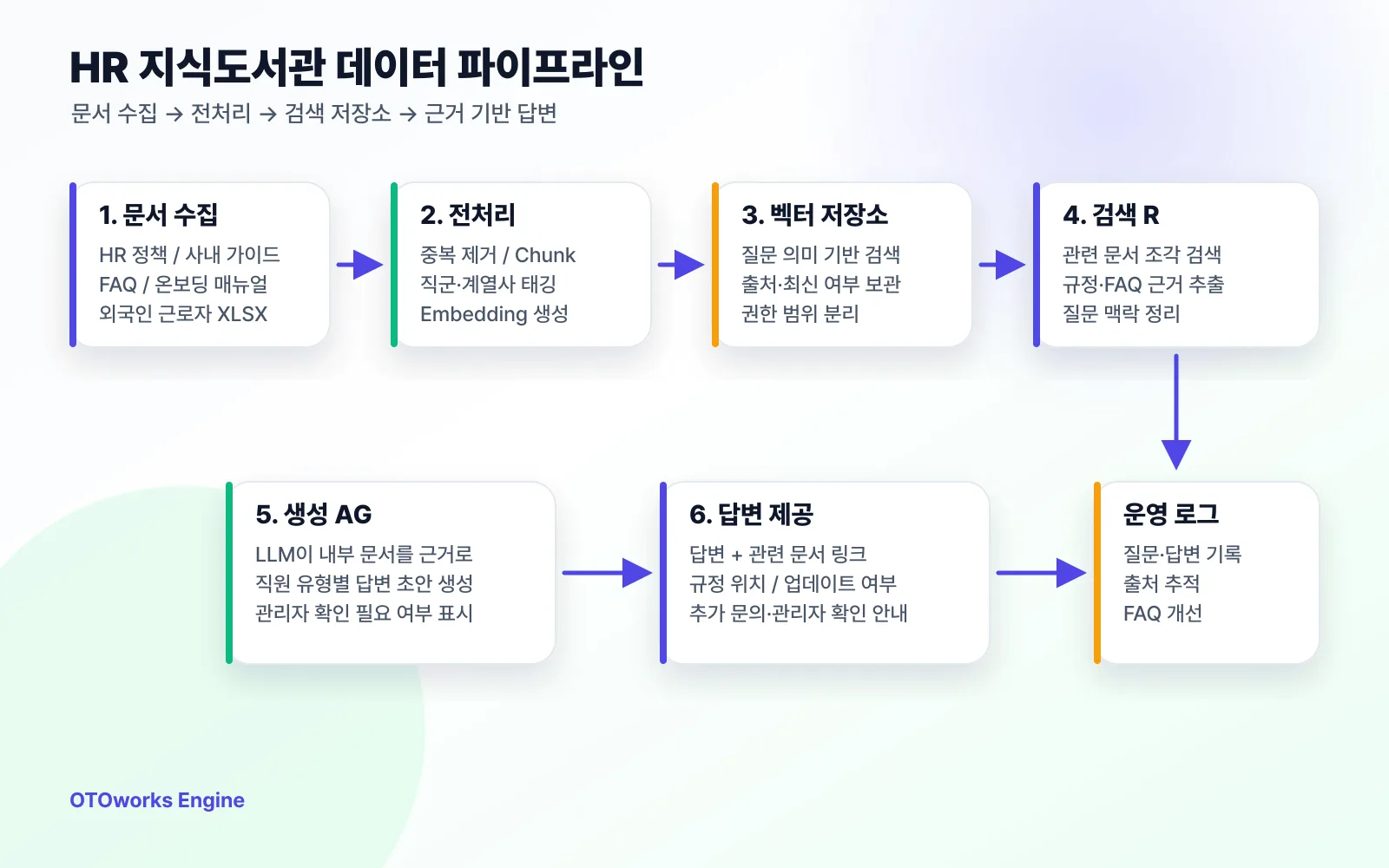
HR policies, guides, FAQs, and onboarding material are cleaned into question-sized chunks and made searchable.
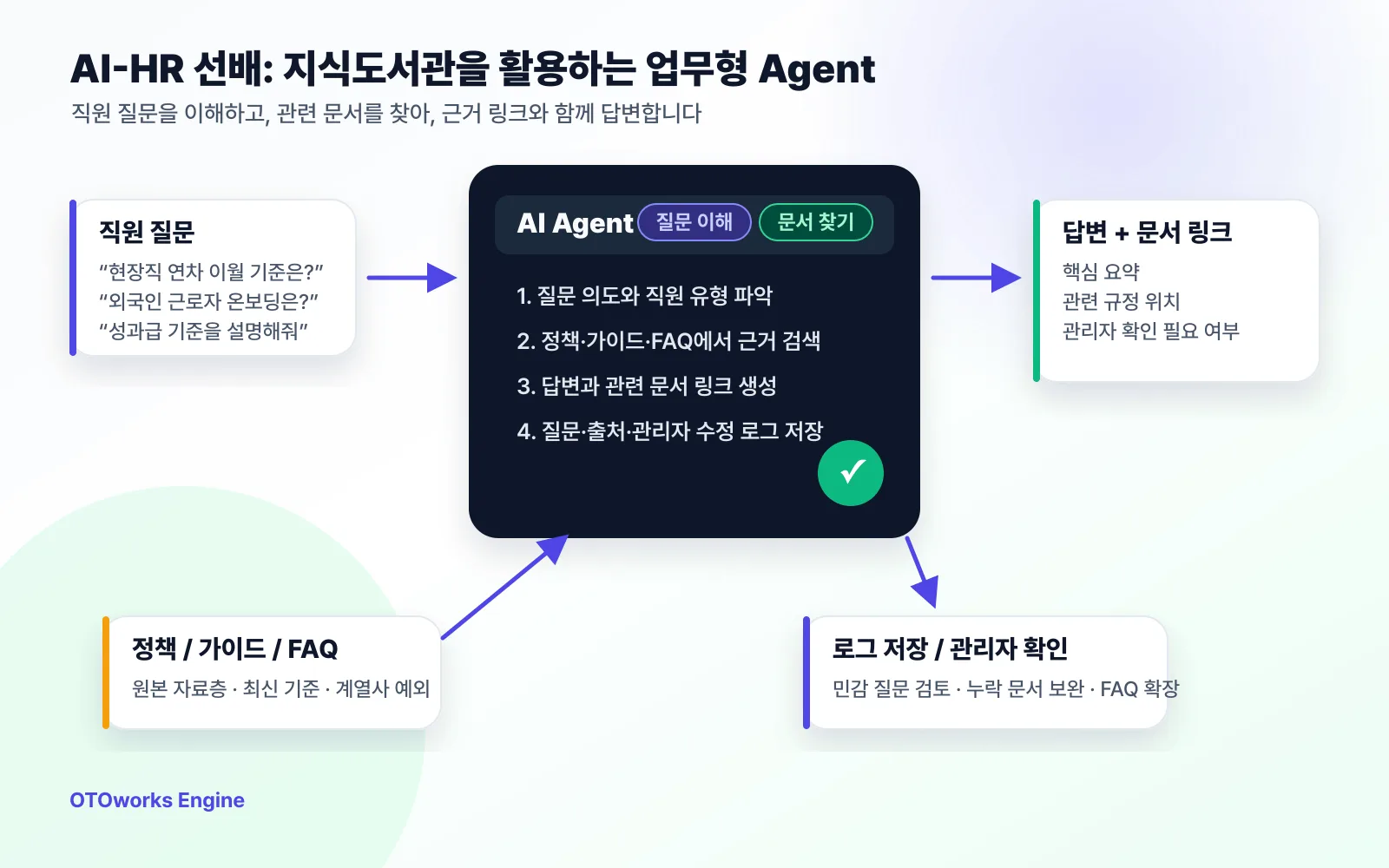
AI HR Senior retrieves the source, drafts the answer, attaches links, and keeps a review log.
The cleanup work was less glamorous than the agent, but it decided whether the agent would be useful. PDFs, Word files, Notion pages, web documents, and spreadsheets could not go in as-is. We removed repeated headers, split long documents into question-sized chunks, and tagged them with the words employees actually used: travel expenses, shift work, foreign-worker onboarding, performance bonus, groupware expense handling. That made retrieval work even when the question did not use the exact wording in the policy.
← Scroll horizontally to view the chart
Knowledge-library pipeline. Documents and support history are cleaned, tagged by role and topic, retrieved for drafts, and then improved through answer logs.
Once the library was usable, we connected AI HR Senior. The rollout still needed people work. HR operators, site managers, and affiliate contacts had different habits, so we agreed on operating rules together. Which questions can the agent draft directly? Which ones need admin review? Which ones reveal that the source document itself is unclear? OTOworks stayed close to real support cases while those rules settled. That is why AI HR Senior feels less like a bot and more like a senior teammate who pulls the right evidence before you answer.
Phase 1
Take a question like, 'How does annual leave carryover work for field employees?' AI HR Senior checks whether the office and field rules differ, whether statutory rules or internal policy apply, and whether an affiliate exception matters. Then it pulls the relevant policy chunks and FAQs into a draft with source links. The operator is no longer staring at a blank page. They are reviewing evidence and deciding exceptions. The same flow runs whether the question came in by email or chat.
Phase 2
The existing material was mostly files, and every operator explained it a little differently. We did not try to solve the whole area at once. We first mapped the basics: employee type, site, procedure, required documents, training items, and owner. That lightweight ontology gave the library enough structure to serve different guidance for new hires, factory workers, foreign workers, and affiliates. Pre-start instructions, factory safety training, residence-document guidance, and groupware onboarding could finally be found by context instead of folder location.
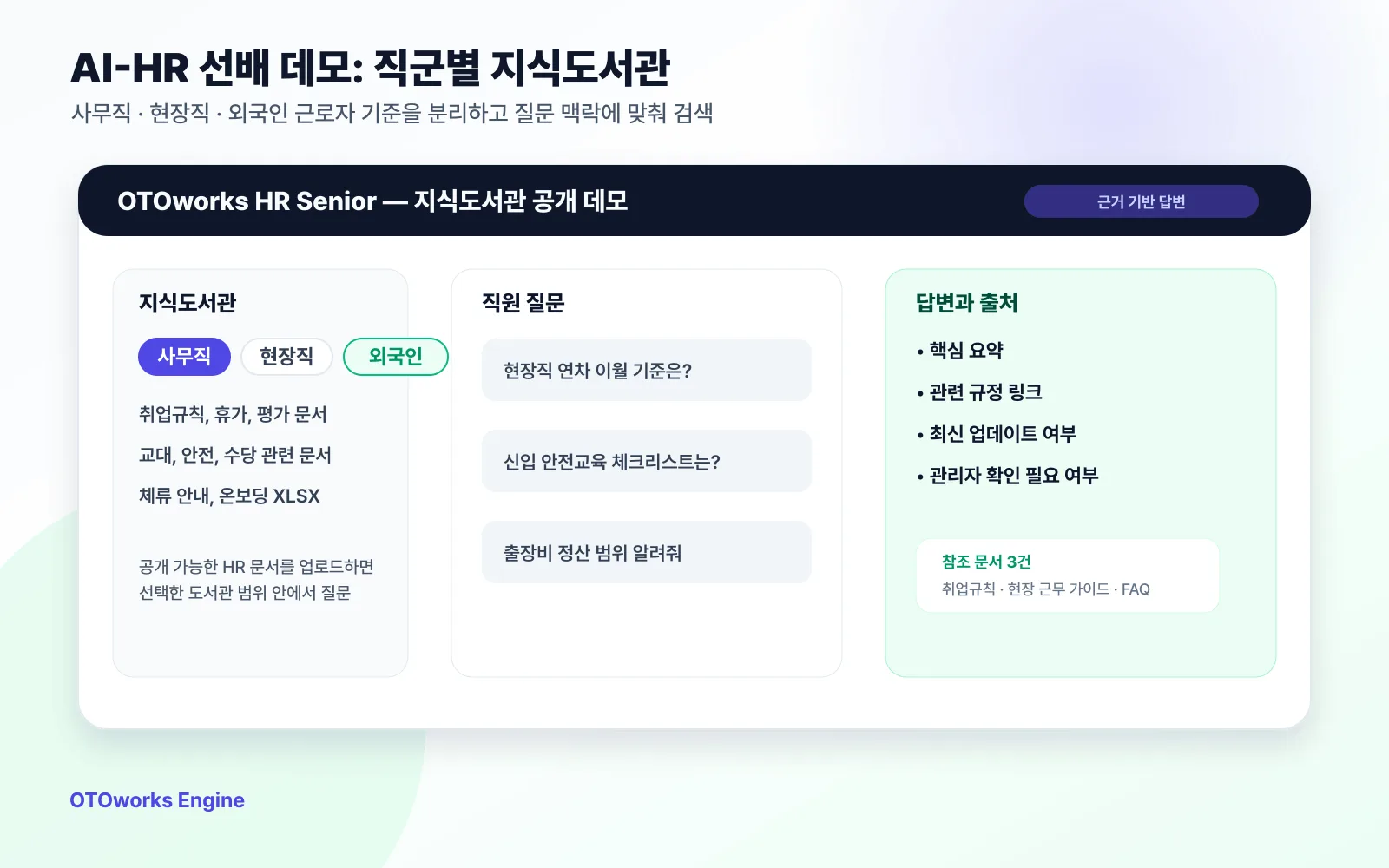
Office, field, and foreign-worker guidance stay separated, so onboarding answers come from the right context.
Phase 3
The client already had performance criteria and tools. The hard part came when ratings affected pay or bonuses. Office roles leaned on ratings and goal achievement. Factory roles added shifts, overtime, night work, and production-line rules. Foreign-worker cases added visa, contract, and allowance context. A black-box calculator would have been the wrong answer. We organized the rules, evidence, and review questions so AI HR Senior could assemble what an operator needed to check.
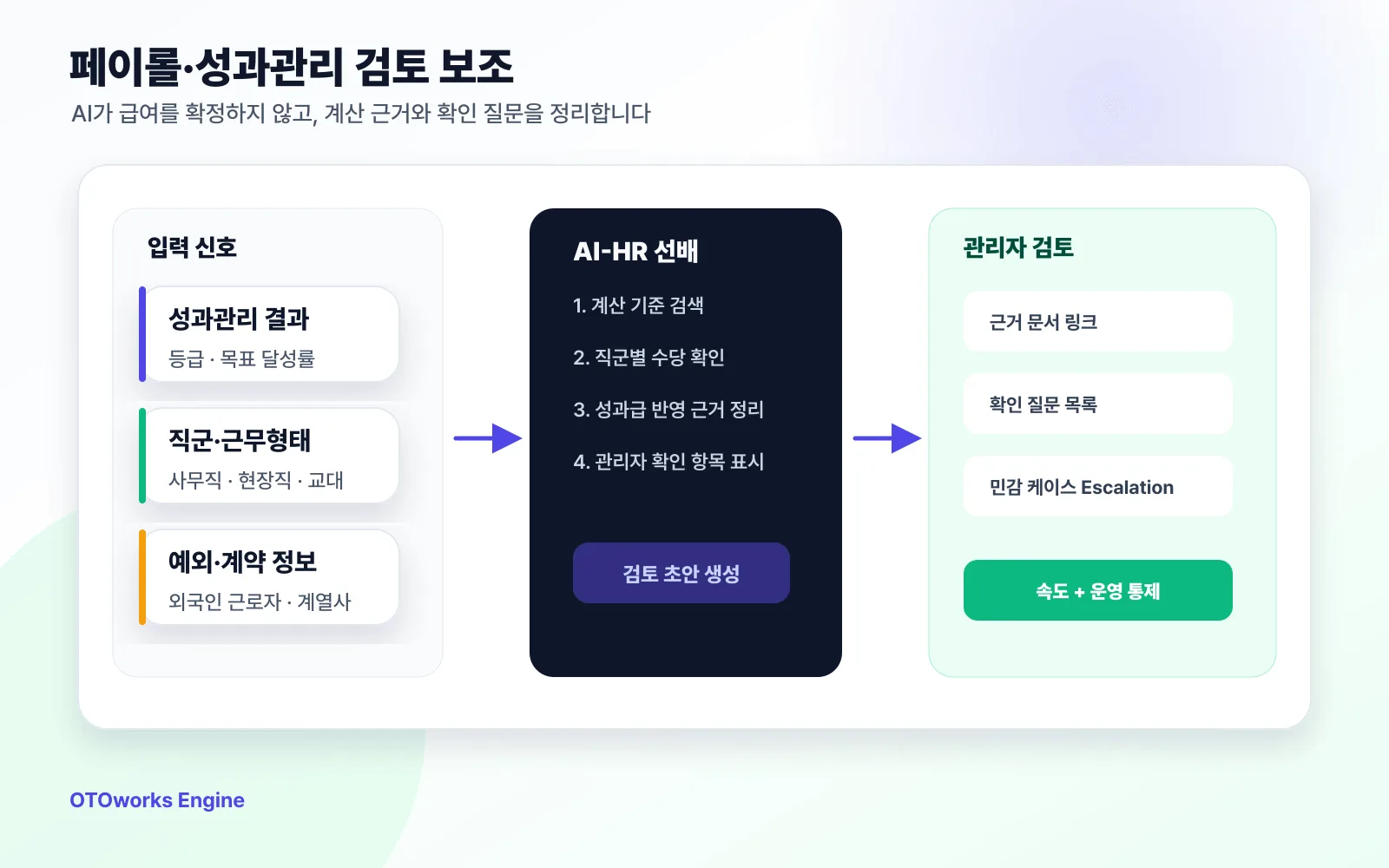
The admin view brings together performance results, allowances, exceptions, and payroll evidence for review.
We kept this part deliberately conservative. Compensation questions should not be finalized by an AI system alone. AI HR Senior summarizes the performance rating, worker type, work pattern, allowance rule, and source policy. Sensitive or unusual cases stay in the admin-review queue. The team gets a faster review packet, but the final call remains with a person. That made adoption easier, especially for payroll and performance work.
The last piece was logging. Every question, source document, answer draft, and admin edit is kept. Those logs are not just audit history. They show what to fix next. Repeated questions become FAQ candidates. Questions with weak evidence become document-backlog items. Affiliate-specific exceptions get their own tags. The more the system is used, the cleaner the library gets, and the more stable the answers become.
Understands employee questions, retrieves source documents from the knowledge library, drafts an answer, attaches links, and flags whether admin review is needed.
A single source for office, field, and foreign-worker rules, separated by question context. AI HR Senior checks this library before drafting. The same pattern is available in the public hr.otoworks.ai demo.
Support-channel habits were mapped before automation. OTOworks worked with real cases to decide what the agent drafts, what admins review, and what documents need cleanup.
Employee type, site, procedure, required documents, training items, and owners are lightly structured so each group gets the right guidance.
Ratings, allowances, payroll rules, and source policies are pulled into one review packet. Sensitive exceptions stay under admin review.
Repeated questions, missing sources, and admin edits become the backlog for improving the knowledge library.
Repeated questions are faster. Sensitive ones are easier to review without losing control.
The biggest shift was where each answer started. Before, even repeated questions took close to 30 minutes, because operators had to reopen documents or find the colleague who remembered the exception. About 30 HR questions came in every day, so the team was effectively burning 15 hours a day just preparing answers. Now AI HR Senior pins down the question and the worker type first, then pulls the relevant policy and a draft out of the knowledge library. Operators check an evidence-backed answer instead of writing from scratch. The same 30 questions are usually done in under 2 hours. Payroll and performance get a different treatment. The agent never makes the final call. It organizes the rules and evidence and hands the case to admin review. Speed improved; control stayed with the HR team.
Annual leave carryover, benefits, travel and meal expenses, groupware expense handling, and onboarding questions now start as evidence-backed drafts. Operators check exceptions and wording instead of starting from zero.
Common rules live in the knowledge library, while affiliate and role exceptions are tagged separately. Whether the question arrives by email, chat, or phone, the same question gets the same answer.
Worker type, site, required documents, training items, and owners are structured enough for AI HR Senior to pull the right guidance when hiring spikes or operators change.
AI HR Senior does not finalize sensitive compensation answers. It bundles rating, role, work pattern, allowance rule, and source policy, then routes high-exception cases to admin review.
When the library cannot support a good answer, the log captures it. Those gaps become the next quarter's document-cleanup backlog.
“Before, every question started with, 'Who knows this best?' Foreign-worker documents, field-worker shift allowances, affiliate travel expenses, all the questions with branching rules were fastest when we could ask the long-tenured person. If that person was out, the answer stalled. Now AI HR Senior identifies the worker type and context first, then shows the related documents, previous answers, and whether admin review is needed. It makes the part that needs human judgment much clearer. For payroll and performance, I actually like that the AI does not make the final decision. It just gathers the evidence. The speed helps, but the bigger change is that answers across email, chat, and phone finally sound consistent.”
Client HR operations leadMid-sized food manufacturing and distribution company
A mid-size food manufacturer and distributor with about 1,000 employees. Office staff, factory workers, and foreign workers each had different leave, allowance, and expense rules, scattered across ERP, groupware, NAS folders, personal notes, and a separate spreadsheet.
A team that spent 15 hours a day on nearly 30 HR inquiries now finishes the same volume in under 2 hours (30 minutes per case down to 5). Five inquiry channels merged into one. Every answer ships with a link to its source document.
The knowledge library (a single source of truth) came first, and the agent was built on top of it. Answers go out with the source documents they were found in. Evidence attachment went from 0% to 100%.
Process AutomationA team that re-explained the company to every AI tool now shares one knowledge layer over one MCP connection. Every answer cites its source; review is a click.
 Process Automation
Half a day per piece down to 30 minutes, revisions from 7 to 1. A small marketing team replaced gut-feel content ops with one ontology-based judgment flow.
 Process Automation
A phone-only solo law practice now takes inquiries 24/7: online intake, auto SMS, and AI draft responses, with zero missed consultations.
If the documents exist but every answer still starts from a search, we can organize the material into a knowledge library first, then build an AI HR Senior around your company's rules. Worker types, affiliates, payroll, and onboarding do not need to be solved all at once. Start with the repeat questions that waste time every week.